

Assai Viewport
Find engineering information in the context of your assets
Access drawings, documents and operational data in asset context across your existing systems, without replacing them.
- ↓ 60%
Engineering search time
Global chemical producer
- ↓ 70%
Document retrieval time
Global manufacturer
- 3,500+
Work orders on live P&IDs
European nuclear operator
- <12mo
Typical ROI timeframe
Confirmed across deployments
Information spread across systems. Context in one place.
Engineering, operations and maintenance teams often need information held across document management systems, maintenance applications, historians and shared drives. Finding the records associated with one asset can require searches across several systems.
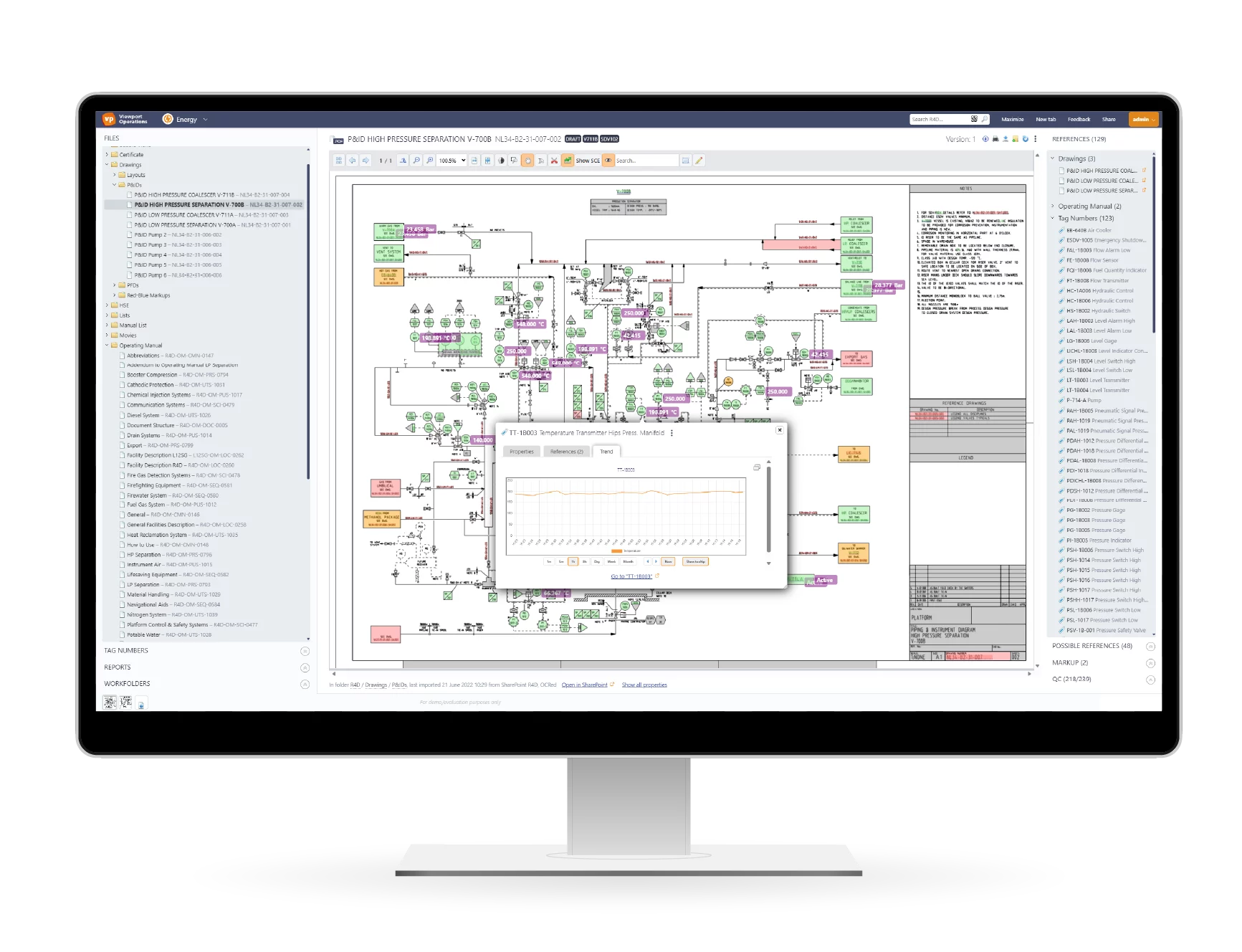
Assai Viewport connects drawings, documents, equipment tags and operational data in asset context. Teams can start from an asset or P&ID to access related information from connected systems, supporting maintenance planning, incident investigations and engineering reviews.
Three capabilities. One connected picture.
Assai Viewport doesn’t replace your existing systems. It reads across all of them and surfaces what you need.
01
Find information by asset or tag
Search for an equipment tag or asset ID to find related drawings, documents and records across connected systems. Bring legacy drawings and scanned documents into the same search experience.
- Interactive, tag-linked P&IDs in seconds
- Search legacy drawings and scanned documents
- Every tag links to live operational context
02
See asset information in context
Use a P&ID as your starting point to explore related documents, work orders, maintenance information and live process values. Understand the information associated with an asset without searching each system separately.
- Engineering and operational systems in context
- No system replacement required
- 140+ supported data formats
03
Identify information gaps
Reveal missing documentation, conflicting references and broken links between engineering records and assets. Give teams the context to investigate gaps before relying on the information for their work.
- Identify missing or conflicting information
- Connect engineering information in context
- Detect issues before they impact work
Applied across critical engineering workflows
See how Assai Viewport changes what happens when information needs to be found fast.
Without Assai Viewport
Validation delays
Incident reported
A catastrophic failure of UPS-1108 forces production to stop. OMAR requests manuals, work orders, certificates, P&IDs, connection diagrams, and operator logbooks.
Initial response
Operations, Maintenance, Engineering, HSE, and Management start collecting information from multiple systems and repositories.
Several days later
An initial information package is assembled, but conflicting document versions require additional validation.
Day 11
OMAR receives the validated information set and starts the post-mortem analysis.
Day 13
UPS-1108 is replaced and production resumes. Updated SOPs remain difficult to distribute consistently across similar assets.
With Assai Viewport
Investigation accelerated
Incident reported
A catastrophic failure of UPS-1108 forces production to stop. OMAR requests manuals, work orders, certificates, P&IDs, connection diagrams, and operator logbooks.
Initial response
All information related to UPS-1108 is available through a single search across connected systems.
Same day
A validated information package is securely shared with OMAR.
Same day
OMAR and the operator work from the same trusted information set to begin the post-mortem analysis.
Day 1
UPS-1108 is replaced and production resumes. Updated SOPs are available across affected assets.
11 days
To provide validated information (without)
<1 day
To provide validated information (with)
Validation delays
Shared across operator and regulator
North Sea offshore operator with engineering, maintenance, and operational information accessible through a single search.
Without Assai Viewport
Manual planning
Morning planning starts
Operations, Maintenance, and Contractors gather to plan the day’s activities using SAP PM, PI System data, and paper P&IDs.
3,500 work orders reviewed
Work activities are assessed across more than 1,400 P&IDs. Actions and dependencies are manually marked on drawings.
Conflicts identified
Potential conflicts between work orders and asset conditions must be found and resolved before execution can begin.
Planning approved
Operational management reviews the final plan before field work is authorised.
Work begins
After approximately two hours of planning, teams enter the field with manually marked-up P&IDs.
With Assai Viewport
Planning in context
Morning planning starts
SAP PM work orders, PI System data, and as-built P&IDs are available in a single environment.
Work orders in context
Work orders, asset information, and operational context are available directly from the P&ID, helping teams understand planned activities before work begins.
Conflicts highlighted
Potential conflicts and dependencies are identified automatically before work begins.
Planning approved
Teams work from a shared, validated view of planned activities and asset status.
Work begins
Field execution starts after approximately 20 minutes of planning.
2 hours
Daily planning session (without)
20 min
Daily planning session (with)
3,500+
Active work orders
European nuclear operator with 3,500+ active work orders across 1,400 linked P&IDs and 300,000+ connected tags
An introduction to Assai Viewport
Watch this two-minute overview to discover how Assai Viewport helps teams find engineering documents and understand asset information across existing systems.
Connect the systems your teams already use
Assai Viewport connects engineering documents, maintenance information and operational data in asset context across your existing systems, without replacing them.
Part of the Assai platform.
Use Assai Viewport alongside your existing systems, or combine it with Assai DMS and Assai Enterprise to control documents and verify engineering information updates across systems.
Standalone
Access engineering information in asset context across existing systems.
With Assai DMS
Add document revision control, reviews, approvals and transmittals.
With Assai Enterprise
Coordinate engineering information updates and verify completion across systems.
What teams achieved with Assai Viewport
3,500+
Work orders on P&IDs
1,400
Linked P&IDs
300K+
Linked tags
Assai Viewport gave us real-time confidence in maintenance planning and safety oversight.
↓70%
Document retrieval time
↓80%
Duplicates
95%
User adoption
Assai Viewport gave us a complete view of how our information relates and confidence that what we find is always current.
↓40%
Work planning time
↓60%
Document retrieval time
↓45%
Coordination
Assai Viewport made it easy to find the right data, even when we weren’t sure where to start.
Lead Asset Manager, Manufacturing Operations
Global manufacturer · Turnaround planning
FAQs
What is Assai Viewport?
Assai Viewport is software that connects engineering documents, drawings, equipment tags and operational information across existing systems. It helps engineering, operations and maintenance teams find information and understand it in the context of an asset.
What is Assai Viewport used for?
Teams use Assai Viewport for maintenance and work planning, incident investigations, engineering reviews and daily operations. Starting from a drawing, P&ID or equipment tag, they can explore related documents, work orders, maintenance history and live process values from connected systems.
How does Assai Viewport differ from a document management system?
A document management system controls document revisions, reviews, approvals and transmittals. Assai Viewport connects information across systems and shows how documents relate to equipment, work orders and operational data. It can work alongside Assai DMS or other document management systems.
Which systems can Assai Viewport connect to?
Yes. Assai Viewport integrates with SAP PM, SharePoint, historians, CMMS platforms, document management systems and engineering drawing repositories. It supports more than 140 data formats and works alongside your existing systems without requiring you to replace them.
Can Assai Viewport work with legacy drawings and scanned documents?
Yes. Assai Viewport makes legacy drawings and scanned documents searchable and helps link recognised equipment tags to related information. This allows teams to use historical engineering records alongside information from connected operational systems.
Does Assai Viewport replace existing systems?
No. Assai Viewport works alongside your existing systems, which continue to manage their records. It can be used as a standalone solution or combined with Assai DMS and Assai Enterprise.
See your asset information in context
Explore how Assai Viewport connects drawings, documents and operational information across systems like yours.
Your demo includes:
- Search across drawings, documents, and operational information
- Real-time P&ID overlays with live sensor data
- Access information across SAP, SharePoint, CMMS, historians, and drawing archives
- Explore engineering information in context