Author: wildsea

  • The Project Planner’s Guide to Document Planning

    The Project Planner’s Guide to Document Planning

    In complex engineering projects, the status of documents is a crucial indicator of the overall project status. Project planners play a vital role in ensuring that all project documents are well-managed, up-to-date, and accessible to all stakeholders. This guide outlines the key steps project planners can take to effectively manage their project documents, including the relationship between the project planner, project manager, and document controller.

    Step 1: Define the Document Management Plan

    The first step in effective document management is to create a Document Management Plan (DMP). The DMP outlines the processes and procedures for documents. The processes include creation, revision, distribution, storage, and retention. It should be based on the project’s requirements, including relevant laws, regulations, and industry standards. Moreover, the DMP should specify the roles and responsibilities of all stakeholders, including the project manager, document controller, and project planner.

    Step 2: Implement Document Control Processes

    Once the DMP is in place, the next step is to implement the document control processes outlined in the DMP. This includes creating a document numbering and naming system, setting up a centralized document repository, and establishing a review and approval process. The document controller should maintain the document control processes and ensure that all project documents are properly stored and organized.

    Step 3: Monitor Document Status

    Project planners should regularly monitor the status of all project documents, including document revisions, approvals, and distribution. In this step, project planners identify potential problems or delays by keeping track of document status and taking corrective action. In addition, monitoring document status helps ensure that all stakeholders have the most up-to-date information and can make informed decisions.

    Step 4: Communicate Document Status to Stakeholders

    Communicate the status of all project documents to all stakeholders, including the project manager, document controller, and other team members. This includes providing regular updates on document revisions, approvals, and distribution. Effective communication helps ensure that all stakeholders know the project’s current status and can make informed decisions. In Assai, email notifications can be set up to prevent documents becoming overdue.

    Relation between the Project Planner, Project Manager, and Document Controller

    The project planner, project manager, and document controller play interrelated roles in successfully managing complex engineering projects. The project planner is responsible for monitoring the status of all project documents and ensuring they are up-to-date, accurate, and accessible to all stakeholders. In the meantime, the project manager is responsible for overall project management. Furthermore, this role ensures that the project delivery is on time, within budget, and to the required quality. The document controller manages all project documents, including document control processes and repository management.

    Summarizing

    In conclusion, effective document management is critical to the success of complex engineering projects. So, project planners play a key role in ensuring that all project documents are well-managed, up-to-date, and accessible to all stakeholders. By following the steps outlined in this guide, project planners can effectively manage their project documents and contribute to the overall project’s success.


  • Document Management Plan in 10 Steps

    Document Management Plan in 10 Steps

    What is a document management plan?

    A document management plan (DMP) is a systematic approach to organizing, storing, and maintaining important company documents in an efficient and secure manner. It provides a clear framework for document management and ensures that all necessary information is easily accessible and properly secured. Companies operating in complex industries, such as the energy sector, benefit greatly from having a DMP, as they often handle large volumes of critical documents that require effective management.

    What is a document management plan?

    A document management plan (DMP) is a systematic approach to organizing, storing, and maintaining important company documents in an efficient and secure manner.

    What is minimally required for a document management plan?

    A comprehensive DMP should include, at a minimum:

    After all, these components ensure that the organization has clear and consistent guidelines for document management, including how documents are stored, who has access to them, and how they should be disposed of when they are no longer needed.

    Why should you store documents in the cloud?

    A cloud-based approach is becoming increasingly popular as it provides many benefits over traditional, on-premise document management systems. The most significant benefits include the following:

    • easier access to documents from anywhere
    • increased security
    • automatic backups
    • reduced IT maintenance costs

    With a cloud-based DMS, employees can access the documents they need from anywhere, using any device with an internet connection. This increases productivity and allows the company to be more agile. Additionally, the DMS provider, such as Assai, typically manages all IT-related tasks, significantly freeing up internal IT resources and reducing the risk of data breaches.

    10 steps to creating a Document Management plan:

    Creating a DMP requires a systematic approach, and the following 10 steps can help guide the process.

    1. Document Type Identification: The first step is to identify the different types of documents the company needs to manage. This can include legal agreements (such as service level agreements), human resources documents, financial proposals, and more.
    2. Access Management: Determine who should have access to each document type and their roles and responsibilities. This step helps ensure that only authorized individuals have access to sensitive information.
    3. Storage and Retrieval: Decide how to store documents and retrieve them when needed. This can include a combination of physical storage and electronic systems.
    4. Risk Assessment: Assess the risks associated with managing different types of documents and determine what measures need to be put in place to minimize those risks.
    5. Security Controls: It is essential to Identify the document security controls to protect the confidentiality and integrity of the company’s documents. This can include access controls, encryption, and data backup and recovery procedures.
    6. Document Management Policies: Develop and implement clear policies for document management, including guidelines for document creation, storage, access, and disposal.
    7. Document Disposal: Define a clear and responsible process for disposing of unnecessary documents to minimize the risk of data breaches and protect sensitive information.
    8. Retention Plan: Define a retention plan that outlines the records management process for different documents. Also, project planners should consider the document retention period and when to dispose of it.
    9. Best Practices: Implement best practices for document management, including document version control, document approval workflows, and document auditing.
    10. Continuous Improvement: Regularly review and assess the DMP to identify areas for improvement and ensure that it remains relevant and effective.

    Summarizing

    In conclusion, a document management plan is essential for organizations in complex industries such as the energy sector. By following the 10 steps outlined above, companies can ensure that their critical documents are managed effectively, securely, and in compliance with industry regulations. A cloud-based DMS offers many benefits and is becoming the preferred option for many companies. By implementing a comprehensive document management plan, companies can increase productivity, reduce risks, and ensure the confidentiality and integrity of their important information.

  • Document standardization: definitions, best practices, and benefits

    Document standardization: definitions, best practices, and benefits

    Worldwide, organizations have been increasingly digitizing their documents. The purposes could range from cost saving and efficiency to sustainability. No matter what, document standardization is essential for any organization’s scale and goal. Some organizations have already implemented document standardization at the workplace with either a document numbering procedure or document templates. But are these all you can do? What else can you optimize? This blog post will discuss other practices you can consider for your organization and the benefits.

    What is document standardization?

    Document standardization is not only limited to establishing and maintaining consistent formats and terminologies. It also refers to procedures for creating, editing, and storing documents. The goal is to ensure that all documents produced by an organization are clear, consistent, and easy to understand. Moreover, the rounded standardization leads to a more effective, efficient, and satisfied workplace.

    Benefits of document standardization

    The entire process of document standardization could be long and exhausting. However, it’s worth it when the organization puts effort into planning and implementing document standardization. Those efforts lead to an efficient, effective, and satisfied workplace by providing the following benefits:.

    • Increased efficiency: Standardizing how to create, edit, and store documents can help reduce errors, save time, and improve the overall efficiency of document processes.
    • Reduced confusion and frustration: By establishing clear guidelines for document creation, editing, and storage, employees no longer have to waste time searching for or figuring out how to format documents. 
    • Better document management: Document standardization properly organizes all documents. It makes retrieving documents easier, secures access control, and improves overall document management.

    Best practices for document standardization

    1. Define the scope and purpose

    Before starting the document standardization process, the team should clearly define the scope of the effort. This also includes what types of documents are involved. Good planning ensures that everyone involved in the process has a shared understanding of the goals and objectives.

    2. Develop a set of standards

    At this step, the organization will create templates, guidelines, and best practices for document creation, editing, and storage. It is essential to involve all relevant stakeholders in developing these document standards to ensure that the established standards are practical among all stakeholders.

    3. Establish document control procedures

    This includes procedures for version/revision control, approval processes, and security measures to ensure that only authorized individuals can access and modify documents.

    4. Communicate to employees

    Communication ensures that all employees understand the purpose and importance of document standardization and know how to comply with the new standards. The organization may provide training sessions, online courses, and written instructions.

    5. Implement the standards

    Start using the standardized document templates, guidelines, and procedures. It is essential to ensure that everyone within the organization uses the same formats, terminologies, and procedures.

    6. Mornitor and evaluate

    Regularly review the standards and procedures to ensure they are effective and make changes as necessary. The organization can do this by conducting surveys, reviewing metrics, and gathering employee feedback.

    7. Maintain the standardization

    Following the implementation and evaluation process, the organization should monitor compliance and provide support to maintain the standards. In addition, we recommend having an annual review and standards update. This help sustain your effort. 

    Is it possible to automate document standardization?

    Yes, it is possible! Many organizations automate parts of their document standardization with a document management system (DMS). Due to automation, the organization can streamline the documentation process and ensure that the stakeholders consistently apply the standards to all documents. These are the example of how DMS can facilitate your document standardization:

    • Ensure version control: The DMS can keep track of multiple versions of a document, allowing employees to access the latest version and ensuring that only approved versions/revisions are made available.
    • Streamline document review & approval: The DMS can automate the document review & approval process, ensuring that the relevant stakeholders review and approve all documents on time.
    • Improve document accessibility: The DMS can provide a centralized document repository, making it easier for stakeholders to access and retrieve the document they need.

    Assai’s document management system

    At Assai, we take pride in offering the best document control and document management system for complex projects and operations in the market. Assai’s cloud-based document management system stores all your items in a central repository equipped with easy and comprehensive search options on metadata and content for documents, drawings, correspondence, emails, and more. The system enables organizations to integrate with tools that fit their requirements, such as Power BI. Also, version control and redlining are a breeze with Assai.

    We offer a system that meets different industries’ needs, including Oil & Gas, Renewable Energy, Construction & Engineering, Transportation, Mining, and Utilities. Our user-friendly, secure, and scalable solutions come with expert support and training. Check it out on our site, and feel free to book a demo!

    Book a Meeting With Assai
    Get in touch

  • Sustainability: How an eDMS can help

    Sustainability: How an eDMS can help

    Many industries and sustainability are closely linked, as industrial activities can contribute to environmental degradation and climate change. However, some organisations are taking steps to become more sustainable in their operations and IT solutions. This includes measures such as:

    • being more efficient
    • reducing their environmental impact
    • minimising the adverse effects on communities

    Despite these efforts, these organisations continue to provide essential products and services to society. However, to ensure that they are addressing global challenges and contributing to a more sustainable future, it’s important for them to align their sustainability policies and practices with the SDGs. The SDGs provide a comprehensive and holistic approach to sustainability and guide organisations to implement sustainable policies and practices. Additionally, it serves as a benchmark for organisations to measure their progress and evaluate the impact of their sustainability initiatives.

    What are SDGs?

    United Nations’ Sustainable Development Goals (SDGs) are a set of 17 goals as part of the 2030 Agenda for Sustainable Development. These goals aim to end poverty, protect the planet, and ensure all people enjoy peace and prosperity by 2030. The SDGs cover various issues such as poverty, hunger, health, education, gender equality, clean water, energy, economic growth, and climate change. Organisations, including complex engineering organisations, can use the SDGs as a guide to attain sustainable development in the 21st century. (Source: Sustainable Development Goals)

    How can an eDMS make an impact on your organisation’s SDGs?  

    (Read more: What is document management, and what is a DMS? )

    In today’s business world, organisations of all types aim to reduce their environmental footprint and meet sustainability goals. This is particularly important for those organisations that are involved in complex projects which have a significant impact on the environment. To meet these sustainability goals, many organisations are turning to an electronic document management systems (eDMS) to help them streamline their processes, reduce their environmental impact, and increase efficiency.  

    An eDMS can help organisations by digitising all paper documents, which reduces the need for physical storage and minimises paper use, a significant contributor to deforestation. Additionally, eDMS can automate workflows like reviews and approvals. It reduces the need for the physical movement of documents, reducing carbon emissions and energy consumption while improving collaboration.  

    The system also provides secure access to documents, enhancing data security. Furthermore, many eDMS have analytics tools/integrations that can track document usage and identify areas for improvement. The tools help organisations tailor document management processes and reduce environmental impact.  

    Let’s explore the SDGs that an eDMS relates to:

    SDG 8: Decent Work and Economic Growth  

    By automating document management processes, organisations can increase productivity and efficiency, supporting the goal of decent work and economic growth.  

    SDG 9: Industry, Innovation, and Infrastructure  

    By implementing digital storage and automated workflows, organisations can support the goal of Industry, Innovation, and Infrastructure by increasing efficiency and reducing waste in their document management processes.  

    SDG 12: Responsible Consumption and Production  

    An eDMS reduces the need for physical storage and minimises paper use. Additionally, automating workflows such as approvals and routing can reduce the need for the physical movement of documents.

    SDG 13: Climate Action  

    Organisations can support the climate action goal by reducing the carbon emissions associated with document management processes, such as travel for document review and approval.  

    SDG 16:  Peace, Justice, and Strong Institutions   

    By implementing secure access to documents, organisations can support the goal of peace, justice, and strong institutions by protecting sensitive information, ensuring data security, and complying with regulations related to data security.  

    SDG 17: Partnerships for the Goals  

    Collaborating on documents through a document management system can help organisations work more effectively with partners, suppliers, and other stakeholders to achieve the SDGs.  

    Summary

    Investing in an electronic document management system is crucial to achieving sustainability goals for organisations. While the benefits of eDMS in reducing paper usage, energy consumption, and carbon emissions have been highlighted, there are additional reasons why organisations should invest in eDMS for sustainability policies. Implementing an eDMS is a strategic move that can improve efficiency, compliance, and cost savings. This can help organisations manage their resources better, streamline their document management processes and achieve sustainability goals.

  • Make a difference with a Document Management and Control System

    Make a difference with a Document Management and Control System

    Have you ever…

    …experienced wasting so much time to retrieve a specific document?

    …encountered errors due to the lack of document standardization?

    …struggled to demonstrate compliance with regulations due to missing documents?

    Employees’ daily challenges in managing and controlling documents in the workplace are known as pain points. These problems can occur in any organization, regardless of size, when document workflow, standardization, and storage processes are not properly implemented. In addition, they can significantly impact an organization’s productivity and efficiency. This blog post will dive into the benefits an organization can reap from investing in a robust document management and control system. Organizations can effectively address these bottlenecks and improve their overall performance by implementing a document management and control system.

    (Read more: What is document management, and what is a DMS? )

    Imagine your organization has implemented a document management and control system…

    More efficiency in time and costs

    One of the main ways that a document management and control system can save time and costs is by streamlining document management processes:

    • Implementing version control to make sure the latest revision is being used throughout the organization
    • document sharing with internal and external parties and collaboration via check-out/check-in functionality

    Employees can spend less time searching for and managing documents and focus more on their core responsibilities. This can lead to increased productivity and can help to reduce the need for additional staffing or overtime from employees.

    Next, a document management and control system can also automate certain tasks:

    These can reduce the need for manual labor. The features free up employees’ time and reduce the need for additional staff to handle these tasks.

    Ensured regulation compliance

    A document management and control system can help organizations with:

    • Document storage and organization
    • Metadata search
    • Access control
    • Audit trail

    These features ensure that all necessary documents are properly stored, organized, and easily accessible. This is important for regulatory compliance because it allows organizations to quickly locate and share relevant documents with regulatory bodies as required.

    Furthermore, a document management and control system can also help organizations maintain proper document retention policies, often a requirement for regulatory compliance. This can include the automatic archiving of older documents and the ability to retrieve and access them easily.

    Additionally, the system can help organizations track who has access to sensitive documents and when they access them. This can be important for regulatory compliance, especially in industries where data security is a big concern.

    Summarizing

    Investing in a robust document management and control system definitely improves an organization in various ways. It is an essential tool for organizations of any size because it:

    • improves efficiency and productivity
    • saves costs
    • ensures regulatory compliance
  • Access Control in Document Management Systems (DMS)

    Access Control in Document Management Systems (DMS)

    Complex engineering projects require a high level of data sensitivity at all stages. Organisations in industries such as Oil & Gas, Renewable Energy, Transportation, and Mining have realised the importance of implementing a Document Management System (DMS) for this purpose. One of the critical features of a DMS is access control.

    (Read more: What is document management, and what is a DMS? )

    Access control in a Document Management System (DMS) enables project managers and system administrators to assign different access levels to users or groups. This allows them to restrict access to specific documents or parts of the DMS to certain users or groups only.

    To implement access control, system administrators first create user roles. These roles define the level of access that a user or group has to the DMS. For example, a project manager may have full access to all documents and the ability to edit them, while an engineer may only have access to certain documents and the ability to view them.

    After creating user roles, system administrators assign permissions to them. These permissions determine the actions that a user or group can take within the DMS, such as viewing, editing, or deleting documents.

    Additionally, access control in a DMS includes measures such as password protection and encryption. These measures ensure that only authorised users can access sensitive information and that the data is protected from external threats.

    The benefits of Access Control in a DMS

    1. Data security

    Access control ensures that only authorised users have access to sensitive information, reducing the risk of data breaches or unauthorised access and maintaining data security.

    2. Improved collaboration

    Project managers can assign different levels of access to different users or groups. This ensures that all team members have the right level of access to the right documents at the right time, which enables them to work together more efficiently.

    3. Compliance with regulations

    By controlling who can access sensitive information, businesses can ensure compliance with regulations such as HIPAA or GDPR. This reduces the risk of legal action.

    4. Better organisation

    Access control helps to keep the DMS organised and easy to navigate. This feature enables users to easier retrieve the documents they need. Less document retrieval and review time leads to organisation’s cost efficincy.

    5. Auditing and tracking

    Access control allows to track and audit the access to the documents, enabling the organisation to know who accesses the documents, when and what changes they made.

    Summary

    Access control is an important feature of a DMS that ensures data security and compliance with regulations by controlling who can access sensitive information. In complex engineering projects, access control ensures the security and organisation of electronic documents and improves collaboration.

  • What you need to know about cloud document management: benefits & challenges

    What you need to know about cloud document management: benefits & challenges

    In today’s digital age, the need to store, manage and share electronic documents has become increasingly crucial for businesses. With the advent of cloud technology, cloud document management has emerged as a cost-effective and efficient solution for organizations. It improves collaboration, increases mobility, and protects sensitive information. This blog post will explore its benefits and challenges.

    More and more companies are using cloud technology to manage their documents. This is because it is easier to share and work on documents with others remotely, and technology has improved.

    What are the benefits of cloud document management?

    1. Accessibility: Cloud document management systems allow users to access, edit, and share documents from any location with an internet connection. This allows for greater collaboration and mobility and improved disaster recovery capabilities.
    2. Scalability: It easily scales to accommodate the changing needs of an organization without the need for expensive hardware or software upgrades.
    3. Security: The system providers typically offer advanced security features, such as encryption and secure data centers. It helps protect against data breaches and unauthorized access.
    4. Cost-effectiveness: As mentioned before, cloud document management systems are typically more cost effective than traditional on-premises systems, as they do not require expensive hardware or software and lower maintenance costs.
    5. Automation: Many cloud document management systems include features such as version control, document search and retrieval, and automated workflows. These features increase productivity and efficiency.
    6. Environmentally friendly: In a cloud-based environment, documents are stored digitally, so papers are unnecessary. This can help reduce an organization’s environmental footprint.
    7. Compliance: The system providers often offer compliance and regulatory features that help organizations meet industry-specific standards and regulations.
    8. Backup and Recovery: Cloud document management systems typically provide automated backups. Some providers offer disaster recovery services to ensure that documents are safe and can be quickly restored in case of any disaster.

    What are the challenges of managing documents in the cloud?

    While there are many benefits of using cloud document management, there are also some challenges to consider:

    1. Internet connectivity: Cloud document management systems rely on internet connectivity to function, so if the internet connection is poor, it can affect the performance and accessibility of the documents.
    2. Security: Despite the advanced security features offered by many system providers, there is still a risk of data breaches and unauthorized access. Organizations must ensure that they have the necessary security measures to protect sensitive information.
    3. Data control: Some organizations may have concerns about where their data is stored and who has access to it. This is known as data control, an important consideration for organizations that comply with specific regulations or laws regarding data storage and access.
    4. Integration: Integrating cloud document management systems with existing systems and processes can be challenging. Organizations must ensure that their cloud document management system is compatible with their existing systems and that there is a smooth transition process.
    5. Training: Cloud document management systems may require staff to learn new skills and procedures, so organizations must ensure that their staff receives the necessary training to use the new system effectively.
    6. Cost: While cost-effective, the system and services cost may increase as the organization’s needs grow. Organizations should ensure that they clearly understand the costs associated with the system and that they can budget for them.

    Is it costly to implement cloud-based document management systems?

    The cost of implementing the system can vary depending on several factors, such as the size of the organization, the number of users, and the specific features and functionality required.

    In general, cloud-based document management systems are typically more cost effective than traditional on-premises systems, as they do not require expensive hardware or software, and there are no maintenance costs. Many providers offer flexible pricing plans, such as pay-as-you-go or subscription-based pricing, which can help organizations better manage their costs.

    Overall, the system is a cost-effective solution compared to the traditional on-premises document management system, as there is no need for expensive hardware or software and no maintenance costs.

  • Handover: from a project to operations

    Handover: from a project to operations

    This is the last article in a series about the typical stages and phases of complex engineering projects. Each article takes one stage and describes how Assai supports the requirements and common challenges of that stage – ultimately contributing to the efficient, timely, (cost-)effective and safe delivery of projects.

    Download all articles on complex engineering stages in a 50+ page PDFA sequence of eight overlapping circles shows project phases: Feasibility Study, Conceptual Design, Pre-FEED, FEED, Detailed Design, Procurement & Fabrication, Construction & Installation, Pre-Comm., and Handover.


    The Handover stage is the last and 9th stage in complex engineering projects.
     

    Handover (and start-up) in a nutshell

    After pre-commissioning and commissioning are completed, the built facility can be started up (start-up or SU phase). This may involve a series of complex actions and evaluations of different scenarios and configuration settings. The various systems and components are slowly ramped up to normal operating levels, while checking for any issues and optimizing performance.

    Eventually, the facility needs to be formally handed over from the project team/contractor to the team or organization responsible for operating the facility, often an owner-operator. The handover from a project to operations is sometimes abbreviated as P2A (project-to-asset). This is normally not just a date but a process of transition, which may already be started earlier in the project by involving operations staff there (e.g. in pre-commissioning or even earlier).

    Once the operations team has received the required information, training and tools (Operational Readiness), and performance requirements have been met, official acceptance certificates tend to be issued to the project team (or contractor). First a Provisional Acceptance Certificate (PAC), followed by a Final Acceptance Certificate (FAC) after passing a performance guarantee period. This marks the end of the project and the transfer of all responsibilities from the project to operations.


    Documentation handover

    A key aspect in any handover, is getting all required/relevant documents and drawings across to operations (e.g. metadata, native files, PDF renditions). These deliverables need to have the required approvals – perhaps accompanied by stamps or digital signatures inside the files – and to have reached the required status (e.g. ASB – “As-Built” for drawings, and IFU – “Issued for Use” for documents).

    A handover requires careful preparation, deliverable selection, and keeping track of what was or still has to be handed over. Depending on the size and complexity of the asset, planning timelines and corporate policies, the documentation handover schedule may vary. It may be done all at once or in batches, e.g. weekly or whenever deliverables are ready to be handed over (‘progressive handover’).

    Earlier in the project, there may already have been (documentation) handovers between project stages, where one party transferred information and responsibilities to the party responsible for the next project stage. Or perhaps just making a selection of project deliverables which should be carried forward into the next project stage (e.g. from FEED to Detailed Design). Although this article focuses on the final handover from a project to operations, most principles of using an eDMS like Assai to support handovers also apply to the handovers between project stages. The Operations phase (with Maintenance & Modifications) is out of scope for this article series. However, Assai support for the asset lifecycle does not stop there. Assai also provides strong support and dedicated functionality for Operations environments and related organizational roles, such as: chief operation officer (COO), plant management, operations support manager, change (MOC) manager, supply chain officers, quality control, maintenance reliability engineers, and operations engineers.


    How Assai supports Handover

    Assai provides out-of-the-box functionality for all project stages (and operations), based on more than 30 years of experience. Key Assai features supporting handover include:


        • Create an Operations’ environment in minutes, in line with project standards & procedures
        • Digital handovers within Assai, between project stages or from projects to operations
        • Easily filter out the documents and drawings required by operations
        • Easily filter out documents and drawings that are ready to be handed over
        • Hand over latest revisions only or include older revisions too
        • Include native files by default or only where required for the individual document
        • Select which metadata attributes to include and exclude
        • Automatic population of handover date and “handover completed” flag
        • Progressive handovers, using the “handover completed” flag and related properties
        • Alternatively, bulk-export metadata and files from Assai for importing into other systems
        • Detailed handover history for both sides; optional transmittals for additional tracking
        • Dedicated reports to keep track of handover readiness and handover progress
        • Records Management module for records to be frozen and retained
        • Detailed audit trails; coverage against liability
        • Advanced reporting capabilities and Power BI integration
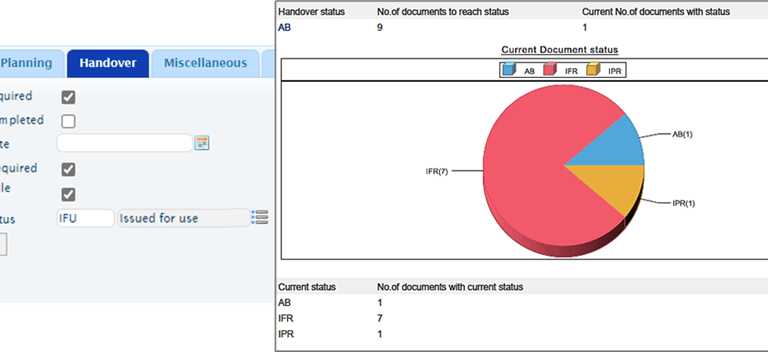
      A software interface shows a pie chart depicting document status (AB, IFR, IPR), a checklist on the left, and tables with the number of documents for each status below the chart.


      Handover preparation, tracking and reporting in Assai

      Plus, as seen in previous articles:


          • Assai offers a proven, specialized, user-friendly and secure eDMS for all project deliverables, no matter the project size or complexity. Everything is traceable and can be reported on.
          • Assai Cloud (or on-premises) is a flexible, turnkey solution with out-of-the-box support for engineering projects from start to end, plus operations, maintenance & modifications, and Digital Twin environments.
         

        Summary

        We hope you found this article about handovers from projects to operations interesting and useful. Please let us know if you have any questions or feedback, or if you would like to explore with us how Assai could support your project(s) and/or operations.

        Book a demo

        A short summary of what was discussed in this article:


            • The handover from a project to operations occurs after commissioning and start-up, but is often a longer period of transition, whereby the project team (or contractor) hands over information, documentation and responsibilities to Operations.
            • The final handover of a facility (incl. all relevant documentation) is often recorded by a Final Acceptance Certificate (FAC), which also marks the end of the project.
            • Assai offers dedicated, smart handover functionality and other powerful features that support the efficient and timely completion of handovers between project stages and from projects to operations.
            • Many industry leaders worldwide trust Assai as their eDMS solution of choice, which is based on 30+ years of industry experience and best practices. Assai promises (and delivers) true out-of-the-box support for all project stages including handover, plus for operations, maintenance & modifications, and Digital Twins.
           

          Download the 50+ page PDF!

          Previous stage: Pre-commissioning

          All articles in this series:

          Feasibility Study
          Conceptual Design
          Pre-FEED
          FEED
          Detailed Design
          Procurement & Fabrication
          Construction & Installation
          Pre-Commissioning
          Handover (current article)

          Want to explore more about Document Management and Document Control? Download our latest whitepaper and guide via the buttons below!

          Whitepaper: What to consider when purchasing a DMSThe definitive guide to document control and document management

        • How to use a DMS to manage your document workflow

          How to use a DMS to manage your document workflow

          Organizations widely use document management systems (DMS) to improve the efficiency and effectiveness of their document management processes. A DMS can streamline the process of creating, reviewing, approving, and distributing documents, reducing the time and effort required to manage documents manually. This can improve document workflow, leading to higher efficiency and productivity.

          What is a document workflow?

          A document workflow is the process of creating, reviewing, approving, and distributing documents within an organization. It includes steps to ensure accuracy, completeness and consistency with organizational policies and procedures. Steps may vary based on document type and organizational needs. However, common elements include:

          • Creating a draft of the document.
          • Reviewing it for accuracy and completeness.
          • Obtaining approvals from relevant parties.
          • Distributing the final revision to the appropriate individuals or teams.

          In simple cases, the document workflow process may involve just a few individuals or teams. However, in certain industries, such as renewable energy, mining, and aviation, the document workflow process can be more complex. These industries often require various document types, including text documents and drawings, and may involve many individuals or teams in the document workflow process.

          What are the challenges of a document workflow?

          Managing document workflow within an organization can pose several challenges. Some common challenges include:

          1. Complexity: In large organizations, the document workflow process can be complex due to the many different types of documents being created and managed. It is challenging to ensure that all necessary parties are involved and that documents are reviewed and approved on time.
          2. Inefficiency: The document workflow process can be slow and cumbersome. Lacking an efficient document management process leads to project delays and reduced productivity.
          3. Lack of visibility: It can be difficult to track the progress of the document workflow process and ensure that all necessary documents are being created and reviewed. Hence, it can lead to bottlenecks and delays in the process.
          4. Poor communication: Poor communication among the individuals and teams involved in the document workflow can make it challenging to ensure that all necessary parties are aware of their responsibilities and the status of documents.
          5. Inconsistent document quality: Without a clear process for reviewing and approving documents, the quality of the documents produced can vary, causing confusion and errors.

          It is crucial to design a clear and efficient document workflow process to address these challenges and use tools and software to support the process as needed. Investing in tools and processes, such as Document Management Systems (DMS), can improve project outcomes and reduced costs.

          How to use a DMS to manage your document workflow?

          1. Revision control

          A DMS can provide revision control features that allow multiple users to work on the same document simultaneously and track changes made by different users. It helps ensure that the document’s final revision is accurate and up to date.

          2. Review and approval

          A DMS enables users to track the review and approval process for documents. It includes the ability to assign tasks, set deadlines, send reminders, and monitor progress.

          3. Distribution

          Users can use a DMS to distribute the final revision of a document to the appropriate individuals, teams, or external parties. They can manage this manually by sending a link to the document or setting up automated distribution based on its content or other criteria.

          4. Collaboration

          A DMS can provide tools for collaboration, such as the ability to share documents with team members and track changes. Moreover, it improves team communication, especially for engineering projects with multiple stakeholders.

          5. Record keeping

          A DMS tracks document workflow progress and keeps records of all documents and their status. This is crucial for engineering projects where accurate documentation is needed to guarantee safety and functionality of the end product. Keeping records of all documents and their status ensures that all parties involved are informed and can review them when needed.

          6. Document security

          In engineering projects, it is often necessary to protect sensitive documents from unauthorized access. A DMS can provide tools for controlling access to documents, such as user authentication and permission settings, to help ensure the security of sensitive documents.

          In conclusion, a Document Management System (DMS) can be an extremely useful tool for organizing and streamlining the document workflow process in different levels of projects. By offering features such as revision control, review and approval, distribution, collaboration, record keeping, and document security, a DMS helps organizations to enhance the productivity and success of their document management processes and in turn, accomplish intricate projects.

        • The importance of version control in document management: A guide to tracking and managing changes

          The importance of version control in document management: A guide to tracking and managing changes

          Version control for document management enables you to track and manage document changes. Documents can include any technical document or drawing, such as blueprints, technical specifications, schematics, and process flow diagrams. This post will explore version control and how it tracks and manages document changes.

          Version control allows multiple people to work on a document concurrently and tracks changes made by each person. It also allows you to recall specific versions of a document later if needed.

          In an engineering environment, version control may be the responsibility of various team members:

          • engineers
          • project managers
          • technical writers

          The specific responsibilities for managing version control depend on the needs and processes of the organization. It is typically a digital activity, as it involves using a software tool to track/manage changes to digital documents. These tools are designed to store and manage version history in a digital format, often in a central repository.

          It is common to track and manage digital documents using version control in the document management system. This can provide a more efficient and accurate way to manage changes and track version history.

          The benefits of a version control system

          1. Improved collaboration: Version control allows multiple parties to work on the same document simultaneously and tracks changes made by each person. This can improve communication and coordination among team members.
          2. Increased efficiency: Version control systems often have tools for comparing different versions of a document. Hence, it helps identify and resolve conflicts more quickly.
          3. Enhanced quality: Tracking changes to a document over time makes it easier to identify and fix errors or mistakes.
          4. Enhanced security: By storing documents in a central repository, it is easier to ensure that only authorized users have access to the latest versions of a document.
          5. Compliance and regulatory benefits: Version control provides a record of the changes made to a document over time, which can be useful for compliance and regulatory purposes.
          6. Disaster recovery: In the event of a disaster, version control can help ensure that essential documents are not lost and can be restored if needed.
          7. Improved organization: By tracking document changes, tracking the most up-to-date versions and seeing how a document has evolved is easier.

          Can organizations build their document management system?

          Organizations can build their document management systems. however, doing so can be complex and time-consuming. This involves designing and implementing a system to track and manage document changes and creating tools and processes for collaborating on those documents. An alternative is to use document management system software, including version control, workflow management, and collaboration tools. It can save time and resources. Version control is a crucial feature in document management systems because it helps ensure that the most up-to-date and accurate documents are being used and improves collaboration, efficiency, quality, and security.