Author: wildsea

  • Detailed Design: completing the engineering puzzle

    Detailed Design: completing the engineering puzzle

    This article is part of a series about the typical stages and phases of complex engineering projects. Each article takes one stage and describes how Assai supports the requirements and common challenges of that stage – ultimately contributing to the efficient, timely, (cost-)effective and safe delivery of projects.

    Download all articles on complex engineering stages in a 50+ page PDF   A flowchart with eight connected circles labeled: Feasibility Study, Conceptual Design, Pre-FEED, FEED, Detailed Design, Procurement & Fabrication, Construction & Installation, Pre-Comm., Handover.

     

    The Detailed Design phase is the 5th in complex engineering projects.
     

    Detailed Design in a nutshell

    The Detailed Design stage follows after the FEED stage (Front-End Engineering Design). The basic design (with typically 12 to 20% of engineering completed) will be refined to 100% – usually by a contractor (e.g. EPC, EPCM or PMC; see below for more) – to enable procurement and construction. This is an iterative process, as different design activities can influence each other; for example, equipment design by vendors or routing of pipes may cause changes to the plant layout design. Cost estimate accuracy in this stage has improved to around +/- 10%. The duration of this stage varies depending on the nature, location, size and complexity of the project.

    In Detailed Design, larger equipment and long-lead items are already procured from vendors and suppliers, to allow integrating equipment dimensions and specifications into the design. Supplied equipment can come with all many kinds of vendor documentation, such as layouts, datasheets and manuals. In-time delivery of all vendor documentation by a (large) variety of equipment suppliers can be a major challenge and risk for engineering projects. It helps to have a clear, accessible, up-to-date Vendor Document Requirements list (VDR, VDRL or SDRL) with links to the related equipment and vendors/suppliers, and clear due dates to enable tracking & expediting of this documentation category.

    The number of deliverables, stakeholders and activities is at its peak in the Detailed Design stage. Staying on top of things now demands a continuous, dedicated Document Control effort, and a suitable eDMS that meets the project requirements. This is crucial for achieving a timely completion and approval of all project deliverables, and prevent costly project delays or other (unplanned) deviations.


    Key deliverables and outputs

    A selection of typical deliverables of the Detailed Design stage:


        • Scope of Work
        • Project Schedule
        • Constructability Review
        • HAZOP report (hazard and operability study)
        • Process Flow Diagrams (PFD)
        • Pressure Safety Valve (PSV) study
        • 2D models
        • 3D models
        • Detailed designs that can be used for construction and installation
        • Detailed piping drawings such as isometrics
        • Pipe support details
        • Approved vendor drawings and P&ID’s
        • Vendor Data Sheets
        • (Equipment) Process data sheets
        • Equipment List
        • Valve List
        • Line List
        • Tie-in List
        • Instrument Index
        • Single-Line Diagrams (SLD)
        • Material Take Off (MTO; list of materials required for construction)
        • Start up, operating & commissioning procedures
        • Emergency shutdown (ESD) philosophy
        • Demolition drawings
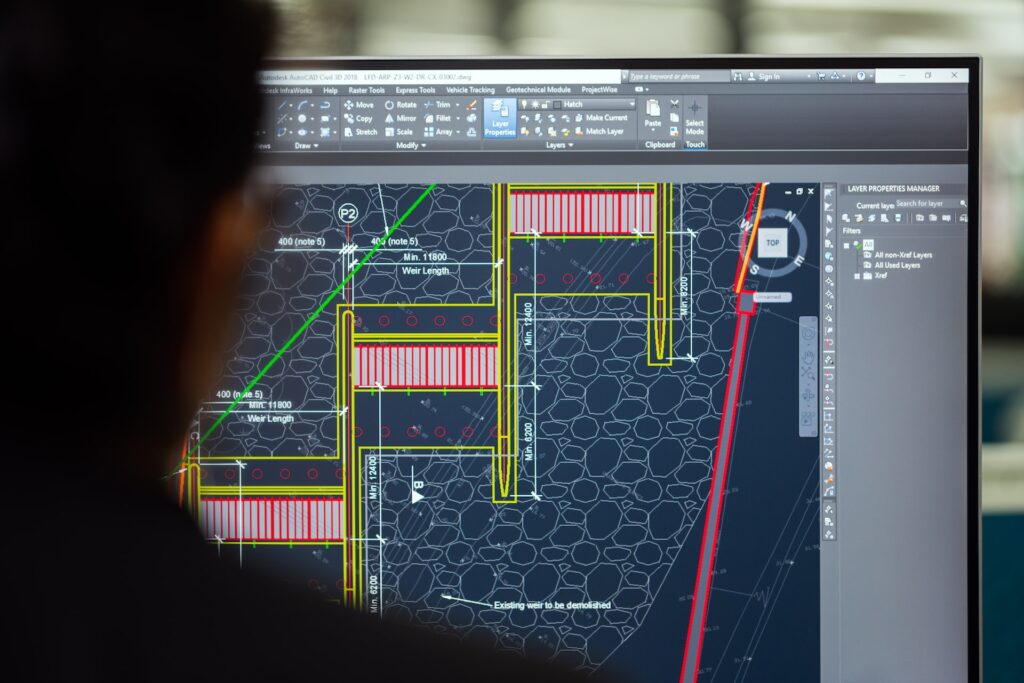
      Detailed Design results in highly detailed CAD drawings


      Detailed Design results in highly detailed CAD drawings
       

      EPC contract models

      The previous article in this series (on the FEED stage) described that clients generally contract out at least the EPC work to EPC contractors. There are many more contact types than the well-known “EPC contract”, some of which extend the responsibilities or ownership of the contractor. The contract type chosen mainly depends on the amount of control desired by the client/owner, the amount of risk accepted/preferred, how clear and precise the Scope of Work is, and the expertise, experience, resources, time and budget available at the client.

      Common EPC contract variants:


          • EPC: full outsourcing of all EPC work to the contractor; a single contract and single point of contact for the client; requires an extremely well-defined project brief, plans and specifications; takes longer to establish; fixed CAPEX (but extra cost for deviations from the Scope of Work); usually significant higher project cost than the EPCM model; less involvement and resources needed from the client; less suited for highly specialist or innovative projects with too many variables.
          • EPCM (with M for Management): the client is involved in management in all stages; more flexibility (to change the scope); all contracts with third parties (e.g. construction contractors, suppliers and vendors) are directly with the client; engineering (design) and procurement are handled by the EPC contractor; more control for the client; easier to establish; usually lower costs (less risk mitigation needed); more involvement and resources needed from the client; suited for less well-defined projects or with more variables.
          • PMC (Project Management Consultant): similar to EPCM but the PMC contractor only takes care of engineering management and also overall project management; the client has direct contracts with engineering contractors (besides construction contractors as in EPCM); this splits the responsibility for engineering and project management (PM) between two contractors; suited when the combination of required engineering and PM capabilities is difficult to find in the market.
          • EPCI (with I for Installation): similar to EPC and often related to offshore construction; the contractor takes care of the full installation on-site.
          • EPCC, EPCIC, or EPIC (with I for Installation and C for Commissioning): similar to EPC/EPCI but ‘turnkey’ (LSTK – Lump sum turnkey) for the client: the contractor is also responsible for commissioning.

        In some sectors and industries the EPC model is no longer the dominant one, and new (public-private) models with more even risk distributions have become more regular. For instance the BOT (Build Operate Transfer) model which combines public and private resources, whereby the private party receives operating rights (a concession) for an extended period of time. Other variants seen include BOOT (Build Own Operate Transfer), DBOT (Design Build Operate Transfer), or ones where the asset does not get transferred eventually (e.g. BOO without the ‘T’ or DBFO: Design Build Finance Operate).

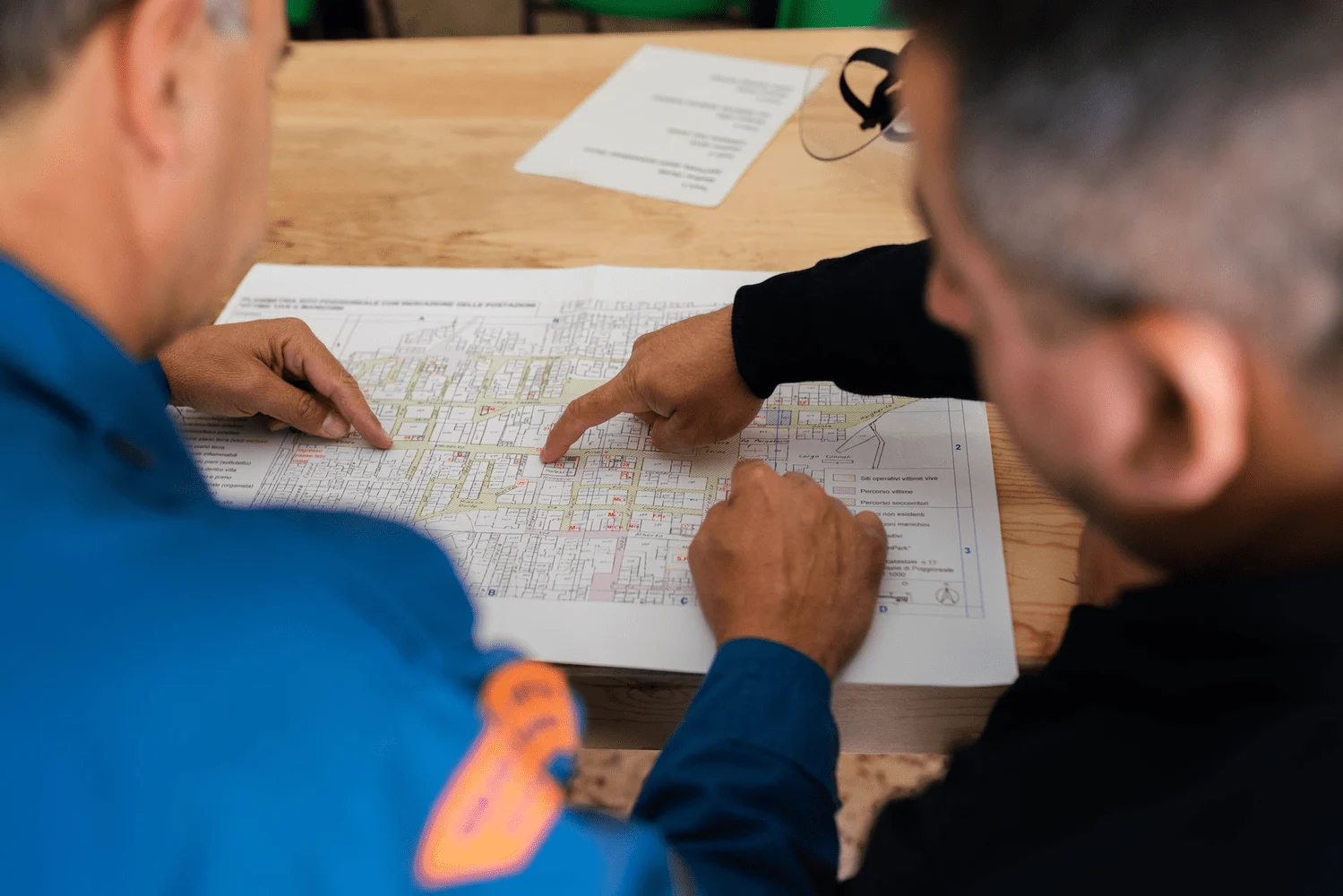
        Detailed Design involves close collaboration between a wide variety of disciplines and companies.


        Detailed Design involves close collaboration between a wide variety of disciplines and companies.
         

        Project control with Document Control

        Document control – simply stated: being and staying in control of all project documentation – can make or break any engineering project, especially in the hectic Detailed Design stage. When actions are not clear or get missed, planning dates or due dates are exceeded, or information gets lost, that can easily cause a (costly) domino effect for a project, with one delay leading to another. Project milestones cannot be reached if project documentation is not progressing as planned, or if not correctly, timely and fully approved.

        If on the other hand, document control is well-organized with an appropriate eDMS system – one that facilitates all stakeholders, allows finding the latest information fast, keeps everyone aware of actions and due dates, supports efficient and effective collaboration, covers risks and future liability, and gives comprehensive insight into progress and potential bottlenecks at all times – then this suddenly becomes an invaluable enabler for project control (and a cost-saver for the project too).

        Many expensive software companies have promised to support our project requirements, and some tried long and hard, but failed to deliver. Assai have delivered everything they promised in sales presentations and are of great added value.IM/DC department of a major project with ca. 600K documents


        How Assai supports Detailed Design

        Assai provides out-of-the-box support for all project stages (and operations), with over 30 years of experience. The following Assai features are key in supporting clients and contractors during Detailed Design and making sure everything is ‘AFC’ (Approved for Construction) in time:


            • Easy, unambiguous access to relevant information for all project roles
            • Highly efficient information exchange with external parties: Assai Portal
            • Never any doubt about the latest revision or latest information
            • Store any file type; integrated file viewer (with redline markup capability)
            • Out-of-the-box, flexible workflows for review & approval
            • Distribution matrix to simplify and automate document distribution
            • Full action tracking, with (proactive) automatic and manual reminders
            • High levels of automation for engineers and Document Controllers
            • Dedicated planning module; organize deliverables in a WBS
            • View progress and forecasts at any level: document, work package, project
            • Vendor document control features (easy VDRL tracking & expediting)
            • Store Purchase Orders (PO) and associate with documents
            • Assets module: associate documents with tags, equipment etc. for Operations
            • Technical query module to handle change requests and more (RFC, RFI)
            • Correspondence module to centrally store official letters
            • Easy preparation of construction work packages
            • Easy management of roles, responsibilities and user/group access
            • Detailed audit trails; coverage against liability
            • Many standard reports & dashboards, Power BI reporting
            • Extensive REST API integration options

          Plus as described in previous articles:


              • Assai offers a proven, specialised, user-friendly and secure eDMS for all project deliverables, no matter the project size or complexity. Everything is traceable and can be reported on.
              • Assai Cloud (or on-premises) is a flexible, turnkey solution with out-of-the-box support for engineering projects from start to end, plus operations, maintenance & modifications, and Digital Twin environments.

            Assai supports Detailed Design by providing a topnotch eDMS.


            Assai supports Detailed Design by providing a topnotch eDMS.
             

            Summary

            We hope you found this article about the Detailed Design stage interesting and useful. Please let us know if you have any questions or feedback, or if you would like to explore with us how Assai could support your project(s).

            Book a demo

            A short summary of what was discussed in this article:


                • Based on the “FEED package” from the FEED stage, Detailed Design fills in all design and vendor details, which are required for proceeding with procurement, fabrication, construction and installation.
                • Clients or client-operators usually contract out the EPC stages of projects to a contractor, using one of the many possible contract models, such as EPC, EPCM, PMC or EPCI (as explained above).
                • The number of deliverables, stakeholders and activities is at its peak in the Detailed Design stage. Staying on top of things here demands a continuous, dedicated (Document Control) effort.
                • To prevent costly project delays, it is essential to manage the timely completion and approval of huge numbers of project deliverables from different sources (e.g. using an MDR and WBS/document planning).
                • Even more so than in the FEED stage, a specialized eDMS application and Document Control function are critical assets for completion of the Detailed Design stage – efficiently, safely, on time and within budget.
                • Many industry leaders worldwide trust Assai as their eDMS solution of choice, which is based on 30+ years of industry experience and best practices. Assai promises (and delivers) true out-of-the-box support for all project stages including Detailed Design and beyond; even for operations, maintenance & modifications, and Digital Twins.
               

              Download the 50+ page PDF!

              Previous stage: FEED

              Next stage: Procurement & Fabrication

              All articles in this series:

              Feasibility Study
              Conceptual Design
              Pre-FEED
              FEED
              Detailed Design (current article)
              Procurement & Fabrication
              Construction & Installation
              Pre-commissioning
              Handover

              Want to explore more about Document Management and Document Control? Download our latest whitepaper and guide via the buttons below!

              Whitepaper: What to consider when purchasing a DMS
              The definitive guide to document control and document management
            • FEED: Front-End Engineering Design

              FEED: Front-End Engineering Design

              This article is part of a series about the typical stages and phases of complex engineering projects. Each article takes one stage and describes how Assai supports the requirements and common challenges of that stage – ultimately contributing to the efficient, timely, (cost-)effective and safe delivery of projects. 

              Download all articles on complex engineering stages in a 50+ page PDFA flowchart with eight connected circles: Feasibility Study, Conceptual Design, Pre-FEED, FEED (highlighted), Detailed Design, Procurement & Fabrication, Construction & Installation, Pre-Comm., Handover.

              The Feed phase is the 4th in complex engineering projects.  

              FEED in a nutshell

              The FEED or FEE stage (Front-End Engineering Design) – sometimes Basic Engineering, ‘Define’ or ‘FEL-3’ phase – usually follows after the pre-FEED stage (or the ‘Select’ / ‘FEL-2’ phase). Based on the pre-FEED deliverables (mainly the Basis of Design and FEED Scope of Work), Basic Engineering will be completed with the “FEED Package” as a final result. The FEED Package forms the basis for contract bidding for the ‘Execution’ phase: Engineering (Detailed Design), Procurement and Construction – often carried out by one main EPC contractor.

              While the FEED stage on average “only” represents 2% of the total project execution cost, it can save up to 30% on further design and execution cost if done well. With the end in mind, it is also wise to involve construction and operations teams early on.

              Cost estimate accuracy in the FEED stage is typically around +/- 15 to 20% (CAPEX). By the end of this stage, engineering is generally 12 to 20% complete (depending on the amount of detailing needed to consider the project ready for Detailed Design and on the type of EPC contract).

              By the end of the FEED stage, a final investment decision (FID) needs to be made for the engineering project. At this point – with a clear picture of the project scope and cost, and a relatively small part of overall budget spent – there is still a chance to abandon the project if not economically viable or cost-effective after all.


              Key deliverables and outputs

              The main deliverable of the FEED stage is the FEED package. This contains a wide variety of deliverables and forms the basis for EPC contract bidding. Typical FEED stage deliverables include:

                  • Operating philosophy
                  • Project Execution Plan
                  • Master document register (MDR)
                  • HAZOP or SIL reports (process safety studies)
                  • Specifications and standards
                  • Final Plot Plan
                  • P&ID drawings (Piping & Instrumentation Diagrams)
                  • Equipment Lists & Specifications (though no equipment is procured yet)
                  • Line Lists
                  • Mechanical Data Sheet (MDS)
                  • Electrical Data Sheets (EDS)
                  • Instrument Index
                  • Cause & Effect Diagrams
                  • Material Selection Diagram (MSD)
                  • Start of BOM list (Bill of Materials)
                  • Start of 3D models
                  • Vendor list
                  • Licensor selection
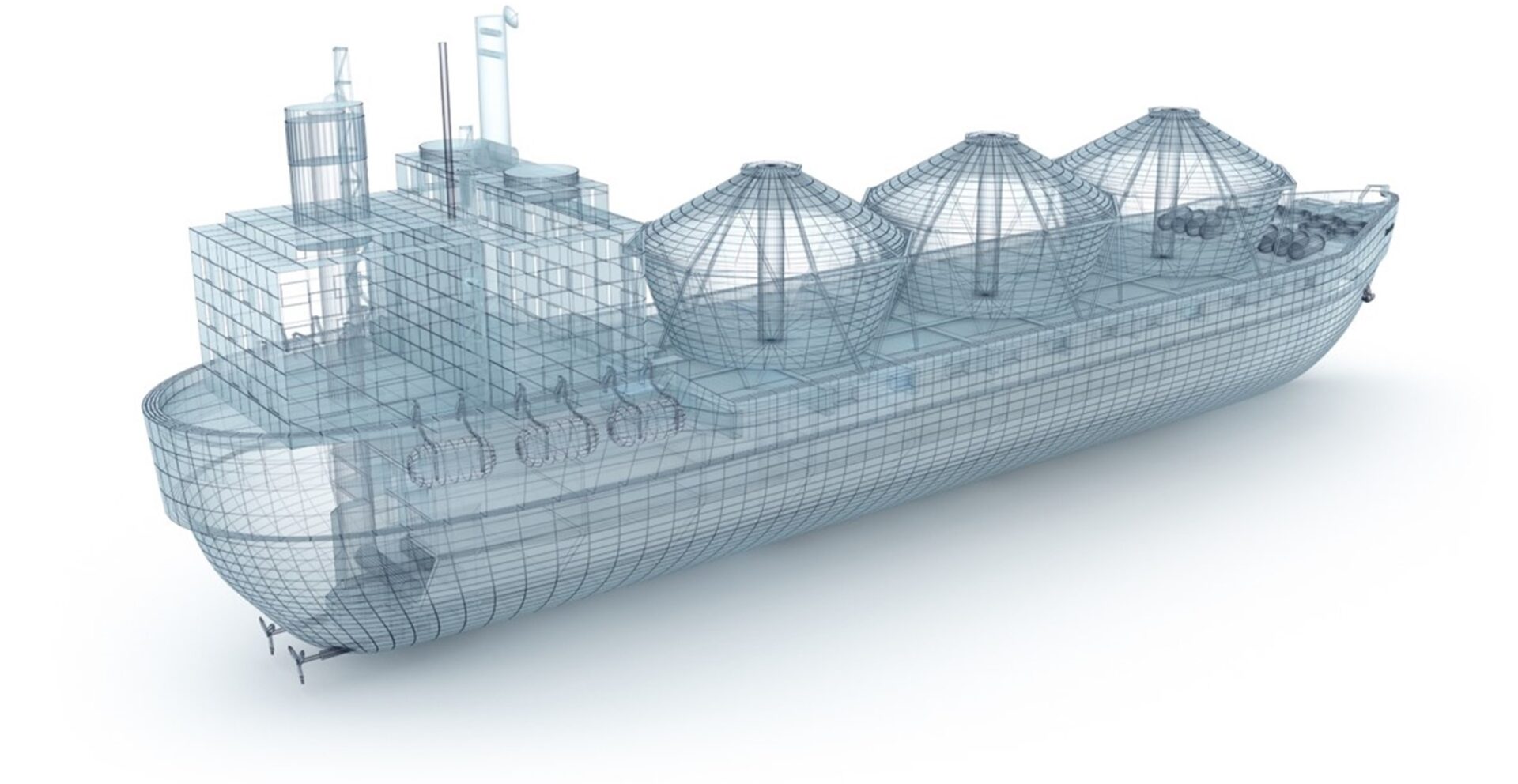
                Initial 3D model of a tanker


                Initial 3D model of a tanker
                 

                Selecting a contractor

                The subsequent project stages – Engineering, Procurement & Construction (EPC) – are often performed by an EPC contractor. Selecting a contractor usually happens through a tendering process, where multiple companies may submit a bid to win the contract, based on the contents of the FEED Package. The FEED Package needs to be sufficiently detailed and specific to receive proposals that meet the project’s requirements and expectations and are easy to compare, but not so specific or demanding as to restrict the options for bidders or even prevent them from bidding at all.

                Outsourcing EPC work to a contractor allows client companies to scale up and down (specialized) resources as required, and make use of their extensive project experience and expertise. Contractors can provide specialists for many different project roles and engineering disciplines; e.g. Process, Process Safety, Civil, Structural, Mechanical, HVAC (Heating, Ventilation and Air Conditioning), Piping, Electrical, Instrumentation and HSE (Health, Safety & Environment).

                The next article in this series (on Detailed Design) will cover some common contract models (e.g. EPC, EPCM, EPCI, BOT, BOOT, DFBO).

                Assai makes it extremely easy for contractors and other externals to receive and submit documentation, after just 30 minutes of training. The level of automation is remarkable. This has saved our projects a lot of time and resources.IM/DC department of a major project with ca. 600K documents


                How Assai supports FEED

                Assai provides out-of-the-box support for all project stages (and operations), with over 30 years of experience. The following Assai features are key in supporting the FEED stage and getting everything ‘AFD’ (Approved for Design) in time:

                    • Powerful document search & drill down options
                    • Never any doubt about the latest revision or latest information
                    • Always clear who has responsibility or actions to complete
                    • High level of automation for engineers and Document Controllers
                    • Out-of-the-box, flexible workflows for review & approval
                    • Collaborative reviews and redline commenting
                    • Generate corporate file templates with pre-populated information
                    • Digital stamping and signing of documents
                    • Automated e-mail notifications of new and overdue actions
                    • Planning & progress at any level; document, work package or project
                    • Assai Portal optimizes collaboration with external parties, saves resources
                    • Store official correspondence with the right access control
                    • Dedicated technical query module to handle any type of query
                    • Assets module: link documents to tags for benefits in next project stages
                    • Simple user account management & access control, Single Sign-On
                    • Records management for records to be frozen and retained.
                    • Mark & track documentation required for handover (to EPC), fully digital
                    • Extensive report & dashboard features, Power BI reporting

                  Plus, as highlighted in previous articles:

                      • Assai offers a proven, specialized, user-friendly and secure eDMS for engineering projects of any size and complexity. Everything is traceable and can be reported on.
                    Keep things organised and get things done with Assai


                    Keep things organised and get things done with Assai
                     

                    Summary

                    We hope you found this article about the FEED project stage interesting and useful. Please let us know if you have any questions or feedback, or if you would like to explore with us how Assai could support your project(s).

                    Book a demo

                    A short summary of what was discussed in this article:

                        • Based on the output of the pre-FEED stage, FEED adds another level of detail to the selected design. This finally results in a “FEED Package” which can be used as the basis for EPC contract bidding (and starting the Detailed Design stage).
                        • The FEED stage usually produces large numbers of deliverables, with many things happening in parallel in a fast-track environment. It is a major challenge to stay in control of all document flows, to keep everything efficient and safe, and everyone productive.
                        • A specialized eDMS application and Document Control function are critical success factors for completion of the FEED stage – efficiently, safely, on time and within budget.
                        • Many industry leaders worldwide trust Assai as their eDMS solution of choice, which is built on 30+ years of industry experience and best practices. Assai promises true out-of-the-box support for all project stages including FEED and beyond; even into operations, maintenance & modifications, and Digital Twins.
                       

                      Download the 50+ page PDF!

                      Previous stage: pre-FEED

                      Next stage: Detailed Design

                      All articles in this series:

                      Feasibility Study
                      Conceptual Design
                      Pre-FEED
                      FEED (current article)
                      Detailed Design
                      Procurement & Fabrication
                      Construction & Installation
                      Pre-commissioning
                      Handover

                      Want to explore more about Document Management and Document Control? Download our latest whitepaper and guide via the buttons below!

                      Whitepaper: What to consider when purchasing a DMS
                      The definitive guide to document control and document management

                      Viewport, an Assai Company, at AUTOMA 2025

                    • Pre-FEED: creating the design basis

                      Pre-FEED: creating the design basis

                      This article is the third of a series about the typical stages and phases of complex engineering projects. Each article takes one stage and describes how Assai supports the requirements and common challenges of that stage – ultimately contributing to the efficient, timely, (cost-)effective and safe delivery of projects. 

                      Download all articles on complex engineering stages in a 50+ page PDFA flowchart with stages: Feasibility Study, Conceptual Design, Pre-FEED, FEED, Detailed Design, Procurement & Fabrication, Construction & Installation, Pre-Comm., and Handover.


                      Pre-FEED: the third stage in complex engineering projects
                       

                      Pre-FEED in a nutshell

                      The pre-FEED stage (pre-FEED is short for preliminary Front-End Engineering Design) – sometimes referred to as ‘Design Basis’ or ‘FEL-2’ phase (if FEL project planning is used) – comes after Conceptual Design and before the FEED stage. It is the final part of conceptual engineering. The selected concept will be defined and detailed further to come to a “design basis” and scope of work (SoW) for FEED.

                      By the end of pre-FEED, key design decisions have been made, risks are clear and mitigated where needed, there is a clear approach for the execution phase, and cost estimates are more precise (CAPEX +/- 30%). Engineering is often 4 to 8% complete by that time. The duration of this stage varies depending on the nature, location, size and complexity of the project.


                      Key deliverables and outputs

                      The two main deliverables of the pre-FEED stage are:


                          • Basis of Design (BOD) document (lists the principles, requirements, criteria, assumptions and reasoning on which design calculations and decisions are based)
                          • FEED Scope of Work (SoW) (summarizes the project scope, schedule & objectives, interfaces, and the work to be done by the FEED contractor)

                        Other typical deliverables of the pre-FEED stage include:


                            • PFD drawings (Process Flow Diagrams; high-level process overviews, more detailed and formal than a Block Flow Diagram (BFD) from Conceptual Design, and less detailed than a P&ID drawing)
                            • Heat and Material Balance, or Heat and Mass Balance (HMB; process overview with major equipment and amount of heating/cooling required, normal operating conditions and flow rates of process streams)
                            • Initial P&ID drawings (Piping & Instrumentation Diagrams; process overviews with all crucial equipment, piping and instrumentation)
                            • Preliminary plot plan or field architecture
                            • Main equipment list
                            • Economic assessments (CAPEX, OPEX, ABEX = abandonment expenditure)
                            • Start of EIA or ESIA (Environmental (and Social) Impact Assessment)
                            • Risk mitigation plans
                            • Enhanced project schedule
                           

                          The importance of Document Control

                          During pre-FEED, the number of documents, drawings, people and activities grows rapidly, as seen above. There will be more official document reviews and approvals, often multiple revisions per document, a larger team, perhaps multiple companies, and usually tighter timelines – and thus higher risks of mistakes, inefficiency, re-work and project delays.

                          This makes it highly beneficial, if not vital, to have a professional eDMS and Document Control business function in place, or to start setting this up now. This needs to be able to accommodate the project’s requirements, standards and procedures. The eDMS should be a reliable central repository where everyone can easily find all latest information, but also have solid Document Control features, such as document numbering and revisioning based on project standards, efficient distribution (standardized and automated), integrated review & approval flows, clear roles & responsibilities, and full traceability. This sets a major step toward the timely and successful completion of the pre-FEED stage.

                          Our advice: select an eDMS in time! Doing this in the busy FEED stage can lead to a less fit or poorly configured eDMS solution, making this a liability instead of a valuable asset. An eDMS is best implemented during pre-FEED or earlier.Arno van Vulpen – Assai


                          How Assai supports pre-FEED

                          Assai provides out-of-the-box support for all project stages (and operations), with over 30 years of experience. The following Assai features are key in supporting the pre-FEED stage and a paperless office:


                              • Powerful document search & folder trees (automated + custom)
                              • Easy maintenance of numbering standards and reference data lists
                              • Easy preloading of the MDR (Master Document Register)
                              • Planning, progress & forecasts at any level: document, work package (WBS) and project
                              • Built-in review & approval flows; highly configurable
                              • Distribution matrix with (pre-)defined roles & responsibilities
                              • Assai Portal for sharing & collaboration with external parties
                              • Extensive automation and self-service opportunities
                              • E-mail notifications about changes and (new or overdue) actions
                              • Easy digital document handover from pre-FEED to FEED
                              • Standard reports and dashboards, Power BI reporting
                            Reporting-and-analytics


                            Reporting in Power BI from Assai

                            Plus, as highlighted in previous articles:


                                • Assai provides a proven, reliable, user-friendly and secure “single source of truth”  for all your project deliverables, no matter the project size or complexity. Everything is traceable and can be reported on.
                                • Assai Cloud (or on-premises) is a flexible, turnkey solution with full support for engineering projects, operations, maintenance & modifications, and integration options with Digital Twin environments and Common Data Environments (CDE).
                               

                              Summary

                              We hope you found this article about the pre-FEED stage interesting and useful. Please let us know if you have any questions or feedback, or if you would like to explore with us how Assai could support your project(s).

                              Book a demo

                              A short summary of what was discussed in this article:


                                  • The pre-FEED stage adds more detail to the design concept selected in Conceptual Design. It creates a design basis and scope of work for the FEED stage, so that can be entered with confidence.
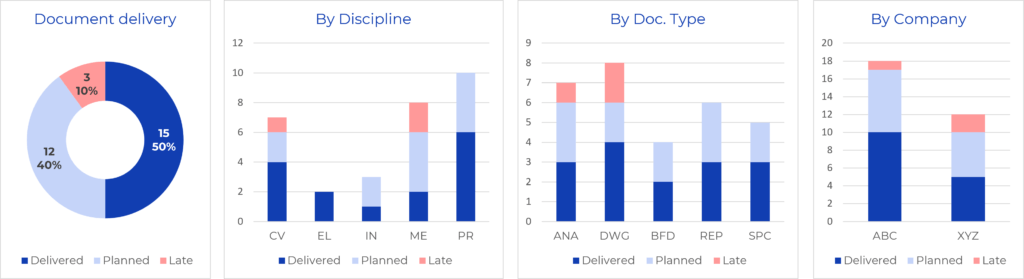
                                  • Pre-FEED generates a wide variety of deliverables and document types, with more formal review & approval cycles, more people, more disciplines and perhaps contractors. It becomes more challenging to stay in control of roles & responsibilities and of what is delivered, planned, or late.
                                  • At this stage, a specialized eDMS application and Document Control function are not just valuable to have; they are critical success factors (CSF) for optimal and timely completion of this project stage.
                                 

                                Download the 50+ page PDF!

                                Previous stage: Conceptual Design

                                Next stage: FEED

                                All articles in this series:

                                Feasibility Study
                                Conceptual Design
                                Pre-FEED  (current article)
                                FEED
                                Detailed Design
                                Procurement & Fabrication
                                Construction & Installation
                                Pre-commissioning
                                Handover

                                Want to explore more about Document Management and Document Control? Download our latest whitepaper and guide via the buttons below!

                                Whitepaper: What to consider when purchasing a DMS
                                The definitive guide to document control and document management
                              • Conceptual Design: starting the design process

                                Conceptual Design: starting the design process

                                This is the second article in a series about the typical stages and phases of complex engineering projects. Each article looks at one stage and how Assai supports the requirements and common challenges of that stage – ultimately contributing to the efficient, timely, (cost-)effective and safe delivery of projects. 

                                Download all articles on complex engineering stages in a 50+ page PDFA sequence of eight connected circles shows project phases: Feasibility Study, Conceptual Design, Pre-FEED, FEED, Detailed Design, Procurement & Fabrication, Construction & Installation, Pre-Comm., and Handover.


                                Conceptual Design: the next stage after the Feasibility Study.

                                Conceptual Design in a nutshell

                                The Conceptual Design stage – sometimes ‘Concept Selection’, ‘Conceptual Engineering’ or ‘FEL-1’ (if FEL project planning is used) – starts after a positive outcome of the Feasibility Study: the project seems technically achievable and commercially viable. This next stage marks the start of the design process, and the three subsequent stages (Pre-FEED, FEED /Front-End Engineering Design, Detailed Design) will each go a level deeper, expanding the design with more details and more accuracy.

                                In this stage, engineers analyze the engineering challenge to come up with (realistic) requirements and solutions. First, design ideas are generated on how the project could be implemented (‘ideation’). Next, gathered design ideas and alternatives are evaluated (‘concept evaluation’) – on their strengths, weaknesses, cost and benefits – to decide on the optimal solution, which meets the requirements and maximizes profits for the client/owner. Cost estimates (on CAPEX/capital expenditures and OPEX /operational expenses) are still quite rough at this stage: easily +/- 50%.

                                The main objective of this stage is to produce a proper conceptual design that provides enough detail and quality input for management to make a decision on proceeding with pre-FEED (or FEED / ‘Define’ / ‘FEL-3’, if Conceptual Design and pre-FEED are combined as ‘Select’ phase). Fundamental design choices in this stage will have a big impact on the rest of the project. The duration of this stage varies depending on the nature, location, size and complexity of the project.

                                Who is involved in Conceptual Design?

                                The client/owner may assign own engineers and/or involve an engineering company at this stage (and a process licensor, if applicable). Engineers from various disciplines are involved to come up with design ideas and elaborate them, in their respective areas of expertise. Project management becomes more crucial now to manage planning & progress and ensure timely completion of all required activities & deliverables.

                                A dedicated Document Controller is usually not required at this stage, but could be valuable. Having an eDMS application will help team members and external parties to find, store & share all project deliverables centrally, define standards, collaborate, review & approve, track actions, plan and report.

                                Once the conceptual design is ready, management (e.g. a board of directors) will decide – based on all relevant information and expert advice – whether or not to move on to pre-FEED or FEED. The outcomes of design analyses (e.g. economics) or changes to internal/external factors and circumstances can also influence this go/no-go decision.

                                Key deliverables & outputs

                                More types of deliverables are produced now by qualitative and quantitative engineering analyses, design activities, cost estimation, studies and meetings.

                                Typical deliverables of this stage may include:


                                  • Functional requirements (FR)
                                  • Preliminary design basis
                                  • High-level design drawings and diagrams (e.g. plot plan)
                                  • Models and simulations (e.g. thermal simulation)
                                  • Technical analyses (e.g. mechanical/structural)
                                  • Commercial analyses (economics/financial)
                                  • Risk register

                                Typical deliverables for projects involving (chemical) processes:


                                  • Block Flow Diagram (BFD) –  A simplified and more informal overview than a Process Flow Diagram (PFD), providing a high-level logical overview of the process structure and streams.
                                  • Material Balance – Overview of materials involved (input and output).

                                Some of the deliverables created during Conceptual Design will be handed over to the next project stage (pre-FEED or FEED) – as essential input to take the design to the next level. Among the other deliverables, a selection may need to be retained as-is, for future reference or to meet regulatory/audit requirements.

                                How Assai supports Conceptual Design

                                During Conceptual Design, the number of deliverables, companies, people and actions starts to increase. Having an eDMS in place helps to keep everything well-organized, efficient, secure and compliant.

                                Assai provides out-of-the-box support for all project stages (and operations), with over 30 years of experience. The following Assai features are key in supporting the Conceptual Design stage:


                                  • Easily give engineers and other groups the access and options they need
                                  • Clear roles & responsibilities, review & approval flows
                                  • Custom workflows (e.g. document creation, correspondence handling)
                                  • Automated e-mail notifications about any (late) actions
                                  • Create a vault per project stage or continue within the same
                                  • Many standard reports and clickable dashboards, Power BI reporting
                                Assai reports and dashboards provide live insight and overview at any level.


                                Assai reports and dashboards provide live insight and overview at any level.

                                Plus, as mentioned in the previous article:


                                  • Assai is a proven, reliable, user-friendly and secure “single source of truth” for all your project deliverables, such as documents, drawings, correspondence and technical queries. Everything is traceable and can be reported on.

                                Summary

                                We hope you found this article about the Conceptual Design stage interesting and useful. Please let us know if you have any questions or feedback, or if you would like to explore with us how Assai could support your project(s).

                                Get in touch

                                A short summary of what was discussed in this article:


                                  • Conceptual Design happens after a positive outcome of the Feasibility Study and forms the start of the engineering design process.
                                  • Interdisciplinary teams generate ideas and solutions to solve the engineering problem at hand.
                                  • If the conceptual design is accepted, the next stage is pre-FEED, or FEED if Conceptual Design and pre-FEED are combined (as ‘Select’ phase).
                                  • The number of different document types, companies, people and actions starts to increase, which makes an eDMS a value-added tool to keep things well-organized, efficient, secure and compliant.
                                  • Assai offers an eDMS solution based on more than 30 years of worldwide experience and industry best practices. It provides true out-of-the-box support for all project stages – specifically also Conceptual Design – and projects of any size (plus operations).

                                Download the 50+ page PDF!

                                Previous stage: Feasibility Study

                                Next stage: pre-FEED

                                All articles in this series:

                                Feasibility Study
                                Conceptual Design (current article)
                                Pre-FEED  
                                FEED
                                Detailed Design
                                Procurement & Fabrication
                                Construction & Installation
                                Pre-commissioning
                                Handover

                                Want to explore more about Document Management and Document Control? Download our latest whitepaper and guide via the buttons below!

                                Whitepaper: What to consider when purchasing a DMS
                                The definitive guide to document control and document management

                              • The Feasibility Study: the right time to consider an eDMS!

                                The Feasibility Study: the right time to consider an eDMS!

                                This is the first article in a series about the typical stages and phases of complex engineering projects. Each article looks at one stage and how Assai supports the requirements and common challenges of that stage – ultimately contributing to the efficient, timely, (cost-)effective and safe delivery of projects. 

                                Download all articles on complex engineering stages in a 50+ page PDF

                                A series of connected blue circles show project phases: Feasibility Study, Conceptual Design, Pre-FEED, FEED, Detailed Design, Procurement & Fabrication, Construction & Installation, Pre-Comm., Handover.
                                The feasibility study is the first of the engineering project stages.

                                The feasibility study in a nutshell

                                The feasibility study is the first phase of an engineering project. Its main objective is to determine whether the project is worth the investment for the owner/client. This could be new development or extension of an asset (greenfield and brownfield projects) – for example a refinery, FPSO, offshore wind park, solar farm, carbon capture & storage, mine, or infrastructure.

                                A feasibility study helps determine if the project is viable and justifiable. Not only technical and economic feasibility is evaluated, but also legal, planning, and operational feasibility, as well as an assessment of the project’s environmental, social, economic and political impacts.

                                The duration of this project stage depends on the nature, location, size and complexity of the project. Completing this stage is a key milestone for any project and the gateway to the Conceptual Design stage (or: Concept Definition). Not all project ideas turn out to be feasible or viable, which is exactly why this stage is so important.

                                Who is involved in the feasibility study?

                                This study often involves a wide range of specialists, such as engineers from different engineering disciplines, geologists, and policy experts. The team size and expertise required also depend on the nature, location, size and complexity of the project. In this stage, the team of engineers is relatively small compared to later stages, because the study provides a high-level evaluation of options and not an actual design yet. External expertise might be hired by the client/project owner, but (sub)contractors usually only come into the picture in later stages.

                                When is the right time to consider a Document Control strategy?

                                It’s never too early to consider a Document Control strategy. The decisions made in this phase have an impact on all subsequent project phases. It does not involve a lot of work and can be kept high-level (like the feasibility study itself) but it’s recommended to already consider the following:


                                  • The project will need an eDMS after passing this stage, and could already benefit from an eDMS right now.
                                  • Experienced Document Controllers can bring much added-value to a project.
                                  • A proper Document Control process will ensure effective and unique reference numbers from the start, prevent loss of any project documentation and time-waste searching for them, and prevent the use of outdated documents or information by any stakeholders.
                                  • What would be the most effective Document Control process, numbering structures (e.g. for documents, drawings, correspondence), revision coding, reference data (e.g. discipline codes and document types) and access requirements.

                                When is the right time to consider selecting an eDMS?

                                While selecting an eDMS often receives a lower priority early in a project, it is very useful to consider early on. This is all too often initiated too late, which means having to select and configure an eDMS under pressure – while the risks and consequences of not having an eDMS start to become apparent – and it distracts from core project activities. As more documents, people and external parties get involved, having an eDMS in place becomes more crucial. Choosing the right eDMS is a strategic choice, in which all the pros and cons of solutions should be evaluated.

                                Chess pieces on a board, with a player thinking about the next move
                                Choosing the right eDMS is a strategic choice, in which all the pros and cons of solutions should be evaluated.

                                There are many different eDMS solutions on the market, but few are tailored to and capable of supporting (complex) engineering projects out-of-the-box, plus not to forget: your project’s requirements, standards and business processes. This makes it quite important to carefully select the right eDMS for your project.

                                Having a high-quality eDMS in place that meets the project’s needs will not only help to keep things well-organized in the current project stage, but also enable a smooth transition into next project stages – which can benefit from the already configured eDMS and an easy handover of relevant documents from the preceding stage (with proper document numbering and revisioning).

                                How Assai supports the feasibility study

                                Assai provides out-of-the-box support for all project stages (and operations), based on over 30 years of experience. While the feasibility study may not involve so many documents and people/parties yet, it is already important to have a clear “single source of truth” for your project deliverables, such as documents and correspondence, with unique reference numbers. Plus to keep track of planning dates, responsibilities, actions, changes, access levels and what more is relevant to record in this stage.

                                As a result, all people and organizations involved will have easy and ubiquitous access to the right and latest information. Stakeholders that need to create documents in Assai can easily do so, with efficient quality-check and review options, as needed.

                                Compliance is also guaranteed by the out-of-the-box (and customizable) authorization structures, user roles & permissions, and traceability of any document file downloads, review & approval history and any changes.

                                Within days, you could have your own Assai Cloud environment – or on-premises/Azure Stack, if preferred – to accommodate any number of projects, documents and users. Configuration is a breeze and can be maintained without the help of Assai consultants. Our experts in document management and document control are there to advise you on best practices and how Assai could optimally support your project. This includes (Power BI) reports and dashboards, with many readily available templates and endless customization options.

                                Summary

                                We hope you found this article about the Feasibility Study interesting and useful. Please let us know if you have any questions or feedback, or if you would like to explore with us how Assai could support your project(s).


                                Book a demo

                                A short summary of what was discussed in this article:

                                • An engineering project usually starts with a feasibility study, to determine if it is worth the investment. This can involve many different specialists.
                                • It is never too early to initiate selection and setup of an eDMS.
                                • Even in early stages, an eDMS provides benefits and reassurance. It also avoids having to select and implement this when things get busy.
                                • Transition to next project stages is smoother with an eDMS.
                                • Assai provides a best-in-class eDMS solution with out-of-the-box support for all project stages, quick setup, easy maintenance. High availability, security and scalability come standard.

                                Download the 50+ page PDF!


                                Next stage: Conceptual Design

                                All articles in this series:

                                Feasibility Study (current article)
                                Conceptual Design
                                Pre-FEED
                                FEED
                                Detailed Design
                                Procurement & Fabrication
                                Construction & Installation
                                Pre-commissioning 
                                Handover

                                Want to explore more about Document Management and Document Control? Download our latest whitepaper and guide via the buttons below!

                                Whitepaper: What to consider when purchasing a DMS
                                The definitive guide to document control and document management

                                 

                              • What is document management, and what is a DMS? 

                                What is document management, and what is a DMS? 

                                Document management is a critical function in any large construction plan or project. Regardless of what industry they are in, any business processes huge volumes of paper and digital documents. Organizations operate most effectively when they can handle documents quickly via automated procedures, free from the stress of time-consuming manual actions or challenging-to-find data. This can be achieved by implementing a DMS, or document management system.

                                What is document management? 

                                Document management is the process of organizing, archiving, retrieving, managing, sharing, and protecting company records.

                                Managing paper documents in the past involved the use of file cabinets, folders, staples, and paper-clips. These days, it also includes a variety of other digital files you use on a regular basis, such as Word, Excel, PDF, and images. 
                                 
                                Obviously, organizing digital files and making them available to the right people becomes a challenge when there are way too many records to handle by lots of users. That is where a DMS becomes useful. 

                                What does the abbreviation DMS stand for?

                                We did some research, as not everyone agrees on what the abbreviation “DMS” stands for. Most however say the abbreviation DMS stands for Document Management System. Others say it stands for Document Management Software or Document Management Solution. What do you think the proper explanation is?Give your opinion on the DMS abbreviation, what does it stand for?

                                What is a document management system (DMS)? 

                                A document management system refers to the secure electronic storage of your documents, enabling all documents—both digital and scanned paper—to be filed, indexed, archived, retrieved, marked up, and shared via encrypted access rights in addition to system reporting ensuring compliance. 
                                 
                                Many systems, such as Assai’s DMS, also include automated workflow functionality. Workflows can be set up in advance when needed to speed up the approval of a digital document. In this way, documents move the same way as they did on paper. However, this time, they are not actually moving but stored in the same save cloud, which makes them simpler to locate. 

                                What is document management?

                                Document management is the process of organizing, archiving, retrieving, managing, sharing, and protecting company records.

                                What is a document management system (DMS)?

                                A DMS (Document Management System) refers to the secure electronic storage of your documents, enabling all documents—both digital and scanned paper—to be filed, indexed, archived, retrieved, marked up, and shared via encrypted access rights in addition to system reporting ensuring compliance. 

                                Benefits of a document management system (DMS)

                                A document management system (DMS) provides many benefits for businesses, such as: 

                                Increases productivity

                                Everyone has access to the files they need whenever they need them, regardless of where they work – in the office, at home, or on the road.  

                                Green office

                                Even while you may still get paper documents and sometimes need to print them, most of the office printing will decrease since a single digital document can be used by the whole organization. Copies are not necessary when everyone has access. 

                                Better cost controls and budgeting

                                You will use less paper as a result, but the savings go beyond that. Digital papers reduce the need for file cabinets and the expense of storing and filing paper records. You can also benefit from lower shipping expenses that come with sending paper documents. You also save time and thereby costs through quicker document retrieval. 

                                Enhances business agility

                                The internet’s speed controls the movement of electronic documents. Additionally, since everyone has access to the necessary information and data, businesses are not restricted by the physical constraints of paper or an office. They can respond to customer needs more quickly, continue running even if the office is closed for any reason, and quickly adapt to changes in the business environment. 

                                Ensures business continuity

                                No matter where you are, you and your team always have access to crucial information. Having access to the cloud allows you to walk out of your office, set up in any other location and keep working. 

                                Disaster recovery

                                Documents are quickly restored from backup. When you use a cloud deployment with its redundant systems, recovery time and recovery point restoration are immediate. 

                                Information governance

                                Revision control is one of the features that helps businesses track changes and document lifecycle. Storing the files in one place also avoids several versions from existing in various places, taking up more server/hard drive capacity. 

                                Cloud DMS or on-premises DMS? 

                                Cloud software is typically available as a monthly or annual subscription. But it has no upfront licence costs, and maintenance and support are built-in. On-premises software requires a large upfront investment in software licences, plus the cost of the application, IT support and hardware. Assai provides both a cloud DMS and an on premises DMS.

                                The benefits of a cloud DMS: 

                                • No need for on-site hardware. 
                                • No maintenance or support fees – only a subscription. 
                                • Secured access anywhere there is an internet connection. 
                                • Quick setup and configuration. 
                                • All data backed up in a secured data centre. 

                                Why do people choose an on-premises document management solution? 

                                • The company’s network must be owned and housed by the company as per the data security policy. 
                                • The IT staff and infrastructure are already in place, including VPN for distant users, as well as for the application, backup, and connectivity. 
                                • Business preference. 
                              • Assai successfully implements Azure Cloud environment in Data Residency Regions

                                Assai successfully implements Azure Cloud environment in Data Residency Regions

                                New privacy regulations can require enterprises of certain countries, such as Rwanda, India and Indonesia, to host their data within the country of operation. These Data Residency Laws proved an issue for Assai, as it meant that customers within these regions would no longer be able to use Assai’s services. With the help of Sentia, cloud service provider, Assai has been able to successfully implement its Azure Cloud environment compliant with local data laws.

                                Assai is an international leader in Document Control and Management Solutions for complex engineering and construction projects. Generally, it hosts its data from four main regions, the European Union, the United States, Singapore, and Australia, with the use of Microsoft Azure’s cloud environment.

                                “When we decided to host Assai Cloud on Azure’s global data centers in 2015, the main advantages compared to on-premise were security, speed, and ease-of-use.” states Floris Schrijvers, CTO at Assai. “But if a customer specifically requested to localize its data in the past, we would suggest using our software on-premise on privately managed servers. In today’s IT landscape, however, we felt that this solution no longer met our standards.”

                                Installing local servers is a seemingly simple solution to comply with Data Localization Laws. However, without strong maintenance and security guardrails, self-owned servers easily become a liability. What happens when a local outage takes place? Who guarantees continuous protection against data theft, or worse, ransom-ware attacks? Another challenge arises when a customer has global teams, who wish to access or retrieve documents from across the world.

                                Floris: “Successfully managing a private cloud requires extensive resources and expertise. We did not want to place that responsibility on our customers. The Azure Cloud Platform offers one of the most secure, reliable, and user-friendly solutions of today. Next to that, it’s supportive of the environmental goals of many organizations, as it reduces their server footprint. That’s why we really wanted to find a way to provide our customers with a way to comply with their country’s regulations without losing their digital advantages.”

                                Assai was successful in addressing this challenge. Combining the resources of Azure with the expertise of Sentia, Azure Expert MSP, and MainOne, a local ISP in the African region, Assai worked to install physical servers in the countries of its affected customers and connect these with Azure Stack. “Azure Stack is a solution that enables developers to centrally manage an application through their own public server and then deploy it locally,” explains Nick Kazen, Cloud Architect at Sentia. “Keeping centralized control of Assai Cloud was essential to guarantee the consistent quality of the platform. As the software now rolls out to local servers, the data of Assai’s customers can remain within the DR Region at all times.”

                                Are you looking for a Cloud DMS, but are you faced with data residency laws within your country? Assai has got you covered!

                              • Records Management in Assai: Retention of records

                                Records Management in Assai: Retention of records

                                Engineering and Construction environments can be very demanding. Assai is the system to support your Records Management. With our roots in the Oil and Gas sector, our system adheres to the highest standards for quality, availability and security. Let Assai’s Records Management give you the control and security that you need.

                                What is Records Management, and why do documents need to be retained?

                                Engineers handle many documents and drawings, that need to be managed and controlled. Some of these require a stricter regime of control. We refer to these as Records.  Records require extra attention. Losing Records can have catastrophic consequences for your project and  organization. For example, some Records may be essential from a construction or maintenance perspective or for reporting and/or legal reasons.

                                Records Management is the management and control of your Records, avoiding loss, maintaining accessibility for authorized users and ensuring revisions are managed correctly. Records Management ensures that project-, operational-, organizational- and legal requirements are met and supported.

                                Assai Records Management

                                In Assai, Records Management is part of the integrated document management and document control functionality. Easy search and drill down options, advanced access control, strong revision control, intelligent numbering structures, archiving and many other options directly benefit Records Management as a practice.

                                In addition to the strict revision control in Assai, documents and drawings can explicitly be marked as a “Record”, and when they are, they are fully protected. Only a select group of dedicated record managers are allowed to modify or delete marked Records.

                                In Assai, Records Management is fully supported by dedicated screens, logging and control reports.

                                Additionally:

                                • Assai supports the full Record life cycle: From the creation of a planned Record, into its design, review, use in operations and ultimately, final disposal.
                                • Records Management is supported by retention policies that can easily be assigned to individual Records.
                                • Since Assai supports large complex projects and assets, bulk loading, bulk updating and bulk deletion functions are available.
                                • Dedicated reports, including lists, graphs and pie charts, help support your Record Management.
                                • Dedicated functions for maintenance, inspection and handover help you fully control your Records.
                                • Assai supports a grace period, which allows for modifications to a Record before it becomes ‘’official’’.
                                • For auditing purposes, all file actions on Records are logged.
                                • Assai truly is a common data environment (CDE), giving any authorized stakeholder inside or outside the organization controlled access to your Records. Records can be accessed either using the Assai application or from a third party application, such as Digital Twin.
                                proces

                                How does it look like?

                                This is what records management looks like in Assai. In the revision details screen, there is a ‘Record’ indicator to mark individual records:

                                screen1

                                Or it can be done in bulk on the dedicated Records Management screen:

                                screen2b

                                Most users in Assai Admin can mark something as a Record, but only authorized users can unmark a Record.

                                Disposal of documents that no longer need to be retained

                                When records no longer need to be retained (e.g. after passing the “retention date” specified for the document in Assai), they may have to be disposed of, i.e. deleted either one by one, or in bulk using the “Delete wizard”.

                                Users without sufficient privileges cannot delete documents with records, therefore the No option is shown.

                                screen3

                                Dedicated users, with specific rights, have more options. They can bulk delete documents, including records. The search option allows you to easily find documents with a past retention date. In fact, there is a two-step process to deleting Records: first the document is unmarked as a record, and then it is deleted.

                                screen4

                                You can apply this to your business, staying in compliance with rules and regulations by retaining documents for as long as required!

                              • Project Planning for the Delivery of Mission-Critical Information with Assai

                                Project Planning for the Delivery of Mission-Critical Information with Assai

                                When delivering large engineering and construction projects with long lead times, it is important to have insight into the progress of documents and drawings. Progress reporting is demanding and labor-intensive, requiring vast amounts of data gathering and updating, which needs to be repeated on a weekly basis. For project planning, it is also a challenge to generate the right reports and management information.

                                Effective project planning and technical documentation delivery is mission critical to support the successful execution of major construction projects.

                                Good planning requires an organized and structured foundation which enable you to reuse and apply common ways of planning and executing across multiple projects. Each new project should also feed back into the foundation for continuous improvement.

                                With a single click, Assai rolls up the progress of documents and drawings to activity level to give you immediate insight into the status of your project planning. Import activities from your planning system and return rolled up progress information back to your planning system or reporting tools, such as Power BI or Excel. Moreover, Assai has numerous out-of-the-box reports available providing progress information in various formats, including S-curves.

                                Assai’s progress reporting is always based on the latest information available in Assai. It is fast, efficient, and accurate.

                                Features include:

                                • Automatic status and approval code updates when documents are issued or returned (transition scheme), along with updated progress percentages.
                                • Milestone sets, which can be automatically linked to documents based on document characteristics. Planned, forecast, and actual dates for documents are automatically calculated based on the durations of milestones.
                                • Forecast and actual dates are automatically updated based on actual progress. Planned dates are never automatically updated to allow for a baseline assessment.
                                • Ability to Import or export data from your external planning tools. For instance, you can view a planning tree imported from Oracle Primavera.
                                • Functionality for calculating work package level progress based on the per-document progress percentage. Doing this regularly to view planned, forecast, and actual progress for your work package visually.
                                • In-depth Gantt chart overview of your work package planning including actual vs planned progress.

                                Get in touch

                              • Assai: Document Management for Oil & Gas Projects

                                Assai: Document Management for Oil & Gas Projects

                                Oil and gas projects and it’s project managers handle an incredible number of documents on a daily basis, including project plans, personnel records, invoices, compliance documentation, leasing agreements, inspection records, and much more.

                                That is why Assai, our document control, and document management software is essential for complex oil and gas projects.

                                Assai helps you digitize all documents, protects your data, and helps streamline & automate paperwork processes like document indexing, transfers, signing, stamping, etc.  – so you can focus on delivering your projects on time and on budget.

                                With Assai you can easily and efficiently:

                                • Organize your documents
                                  • a wide range of documents with different file formats require a document management software that can simply separate and arrange them into folders, stacks, and groups supporting all file types.
                                • Increase productivity
                                  • Assai makes document filing, searching, and sharing more efficient, resulting in a significant decrease of time and resources.
                                • Automate document processes
                                  • workflow tasks such as document indexing, document approvals, obtaining project updates, etc. can be automated when using Assai.
                                • Enhance data security
                                  • Assai allows you to encrypt your documents, to protect them from unauthorized viewing or sharing, even by your own employees.

                                Still have questions about document control and management for your Oil & Gas Firm?

                                Contact us or Book a demo